Assistant Dashboard
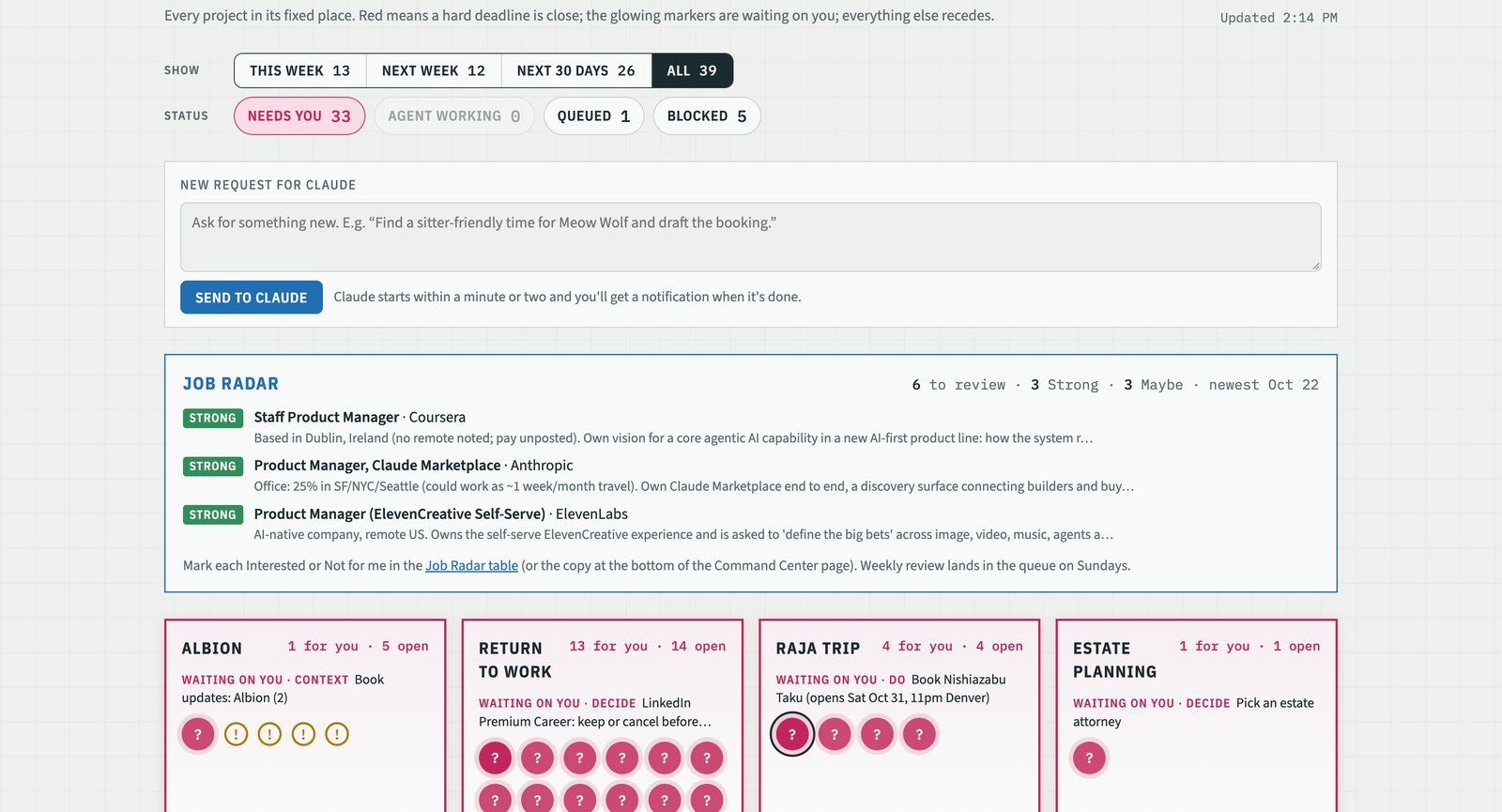
One page that shows every open project in my life as a tile in a fixed place, with one marker per item that needs me. Agents do the work; I approve, decide, and supply context. If I look at it for five seconds I should know whether anything is on fire and whether anything is mine.

What it does
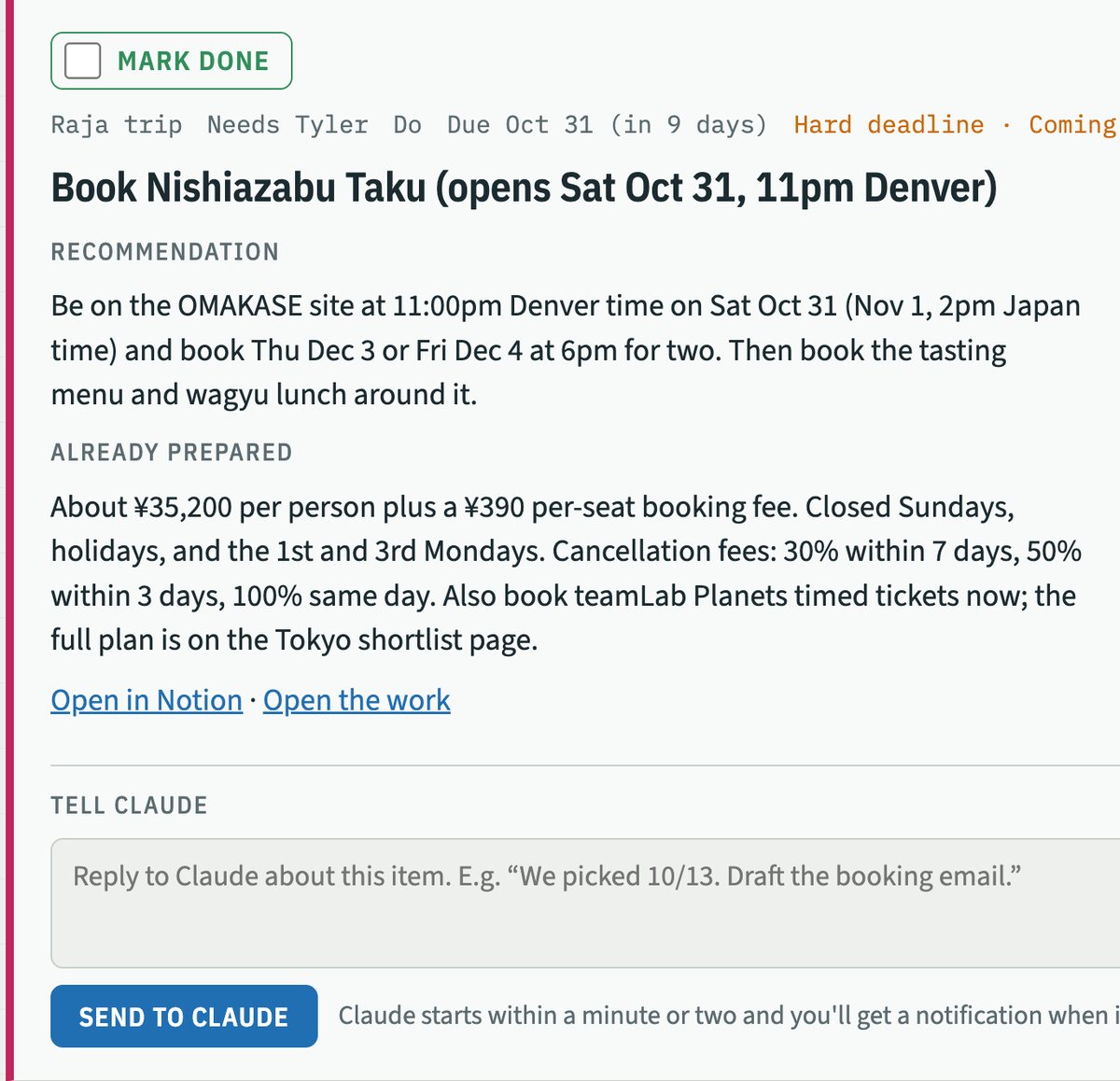
Underneath the page is one Notion table, the Attention Queue: one row per thing waiting on me, across every project. Each row says which project it belongs to, what kind of answer it needs (Decide, Approve, Context, or Do), whether the deadline is hard or soft, what the agent already prepared, and what it recommends. Every agent run in my life ends by writing to this table.
Twice a day, at 7:53am and 3:53pm, a scheduled Claude run works the queue: it checks my inbox for replies before trusting the queue, sweeps my to-do list for anything tagged for it, reads the relevant Project Book, takes up to four items as far as an agent is allowed to, and sends me a short phone summary. The page itself refreshes from Notion every fifteen minutes. Each item card has a reply box; sending a line saves it as a comment on the item and starts a run immediately, so I get an answer in minutes rather than at the next scheduled run. A "Mark done" checkbox writes back to Notion. That's the whole interface.
Why I built it
Every AI assistant I'd used asked me to start. I open a window, remember what I needed, type it, read the answer. What I was missing was the colleague who notices the presale opens Thursday at 10, who already read the forty-message thread with the architect, who says "you have two decisions today and I prepped both." That colleague holds the initiative and hands it back only where my judgment is required.
The parts of my life it helps with don't change much from year to year: health, money, the house, work, the people I care about. Fixed categories want a fixed place on the screen, not a scrolling conversation. So the page is laid out like a site plan. I'm a visual person, and I wanted to see progress and what needs me across every project at once.
How it's built
- The record is Notion. An Attention Queue database plus one Project Book page per project (brief, decision log, open questions, session log). Notion is the system of record because it's the one tool both I and the agents can read and edit, and it works on my phone. If it isn't in Notion, the agent doesn't know it.
- The page is one HTML file. No framework. It reads the queue through the Notion connector and draws projects as plots and items as markers. It reads a saved view rather than querying rows, because Notion's row queries have a workspace quota that the first version exhausted in a day; views don't.
- The attention hierarchy is a formula. Every item has a Hard or Soft deadline and a due date; a Notion formula turns that into an urgency. Hard items go 🚨 Critical inside three days, 🔴 Urgent at four to seven, 🟠 Coming up at eight to fourteen, 🟢 Calm beyond. Soft items never turn red; past due they show ⚪ Slipped and the next run proposes a new date instead of nagging. When anything is Critical, the phone summary leads with it even if nothing else changed. Fun projects live in their own yard with no dates, no colors, and no alerts.
- Runs follow a written protocol. Inbox before queue. Read the book before acting. Stop at the human-only step: deciding, signing, sending in my name, moving money, conversations with family. Write one queue item per decision with a recommendation at the top and the prep underneath. Drafts are written in my voice from a saved style profile, and when I edit a draft before sending, the run compares the two and offers to update the profile. Every run ends by logging what it learned to the book; changes to decisions or preferences are gated behind one item I answer with "go."
- Two rules I'd keep if I threw everything else out. The one-minute rule: if an item takes me longer than a minute to act on, the agent didn't finish its prep, and it goes back. And batching: a few items per project per day, never a stream of pings.
What I learned
It's agile the way the manifesto meant it. The page has had something like a hundred changes since the end of September, and the pattern is always the same: I use it for a few days, something feels off, I describe the change, it ships in minutes. Filters. Sorting. A checkbox. Replying inline. A rule that every recommendation leads with the answer. No single change was the breakthrough; a hundred small ones were. For most of my career, iterating a hundred times in a few weeks was something we said we did. This is the first time it has been literally true.
Product taste is the scarce input. Building is cheap now, so the hours go to deciding what should exist, where it lives on the screen, and what the agent may touch. I've spent far more time on what the morning page looks like than on any script behind it, and I think that ratio is right.
Check the inbox before trusting the queue. The very first run worked a queue that was already behind my email. Every run now starts with Gmail.
Gating stops drift. Early on, the agent's recommendations kept getting logged as my decisions. Now anything that changes a decision, a preference or a brief waits behind a single approval item. Memory is a page I can read, not a transcript I have to scroll, and I want to be the one who edits it.
Status · October 2026
Running daily since September 30, 2026; the page is on roughly its twelfth version. Open threads: triaging text messages (the SMS backup misses RCS), signed-in browsing for scheduled runs, and simplifying the Status × Ask schema. A full write-up of the layout, the attention hierarchy and the reply loop is planned for late November.